Simplified data model
At a first glance, the image below shows the main fields of the customer entity: unique code, status, and trust level. A customer then has one or more accounts, consisting of whitelisted buy/sell address pairs for specific crypto-currencies or blockchains. Transactions represent customer-initiated exchanges between crypto/token amounts and fiat amounts.
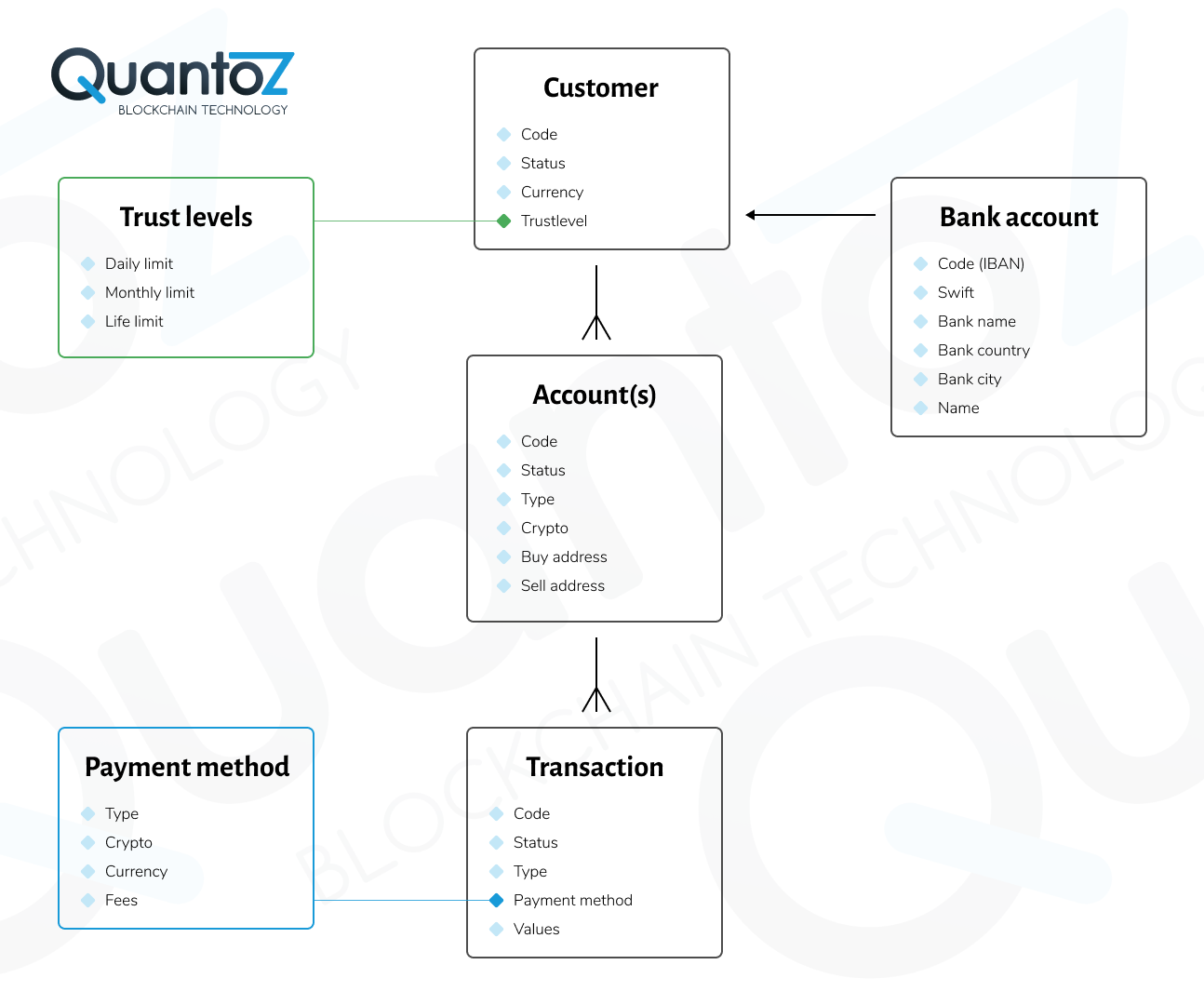
All entities in the data model have a code field as a unique reference for customers, accounts, and transactions in API calls and portal searches. Customer codes are defined by you when creating a customer (via API or portal), while account and transaction codes are generated by Nexus.
You can also include the source IP address of client requests in customer, account, and transaction API calls. Since these IP addresses are stored, they can be used for compliance and customer tracing. This can be combined with country IP blocklists, where requests from blocked countries are automatically blocked.
Customer entity
Status
The available customer statuses are listed below:
- NEW
- ACTIVE
- BLOCKED
- DELETED
Trust level
A customer's trust level defines accepted compliance/fraud risk limits by setting maximum buy/sell amounts per day, month, or lifetime. Once limits are reached, new transactions are blocked.
Properties
In addition to trust levels, you can set extra properties for stricter compliance checks (and optional trust level filtering):
- Business: to differentiate between a business and personal account;
- Allow restricted payments: some payment methods are high risk and limited to specific customers, like credit cards.
Personal details
Optional fields that can be used to store name, email, address, phone and so forth.
Bank details
Optional records are provided to store the banking details of the customer. These can be used for compliance purposes, or to filter/whitelist acceptable both source bank accounts of payments or payout bank accounts. The fields are the following:
- Currency
- Bankname
- Bankcity
- Bankcountry
- Name (as known by the bank)
Entity data
In addition to the standard data model fields, it is possible to define custom fields for each customer record through the API.
Account entity
Status
- NEW
- INVALID
- VALID
- ACTIVE
- DELETED
Crypto/Blockchain
The crypto for which a specific account whitelists blockchain addresses and/or transaction types.
Type
Depending on the account type, several transaction types can be executed and/or addresses can be whitelisted:
| Type | Fixed buy address (customer's private address) | Fixed sell address (in Nexus hot wallet) |
|---|---|---|
| Broker | Yes (whitelisted external address) | Optional (internal address) |
| Custodian | Optional (when allowing on-chain withdrawals) | Optional (when allowing on-chain deposits) |
| Merchant | No (merchants only receive crypto) | No (a new receive address is used from the Nexus hot wallet with each merchant transaction) |
Buy address (return address)
This is the private address of a customer whitelisted to receive crypto. Nexus cannot send crypto to addresses that are not defined in an account with ACTIVE status. The whitelisted addresses can also be used to return the crypto back when the sell transaction limits are exceeded.
Sell address
The address in the Nexus hot wallet assigned to a specific customer. The crypto received on this address is added to the custodian balance of the customer, or traded and paid out to the customer in the case of the broker model.
Transaction entity
Status
- BUYINITIATED
- BUYCANCELED
- SENDING
- SENDDELAY
- BUYCOMPLETED
- SELLINITIATED
- SELLCANCELED
- CONFIRMING
- TOPAYOUT
- PAYOUTONHOLD
- PAYOUTCONFIRMING
- SELLCOMPLETED
- GIFTSENDING
- GIFTCOMPLETED
- RETURNING
- RETURNED
- BLOCKED
- DELETED
Type
BUY, SELL or GIFT are for all Nexus business models. In addition, the custodian model also supports the types SENDOUT, RECEIVIN, SWAP and SENDINTERNAL.
Payment method and reference
This field defines the method used for a specific transaction. The payment methods are defined in Nexus to specify different fees types and (callback) URLs for integration with external payment processors. The Payment Service Provider (PSP) reference can be used to store the transaction reference to the payment.
TxId
The Transaction id on the blockchain containing the specific crypto action. Available only when the transactions is on-chain (not for custodian buy or sell transaction).
Financial details
All currency values and crypto amounts involved with the transaction.