Broker
One of the use cases that Nexus allows you to build is a broker platform, more specifically a portal/app on which customers can buy and sell crypto-currencies. Thanks to our solution, you will be able to design and develop your service without the need to worry about the lower-level inner workings of crypto exchanges, performing transactions and compliance. Just call our APIs and it will be done for you!
Another advantage of employing Nexus as a middle layer interface concerns the customer's experience: for instance, on the hot wallet provided to you different crypto-currencies can be stored. If you have enough funds there and a customer decides to buy an amount that you already have available, they will experience near instant delivery! Not enough funds? No worries, our Tradebot can help you to automatically keep a specific amount of funds always available to offer an even slicker experience to your customers.
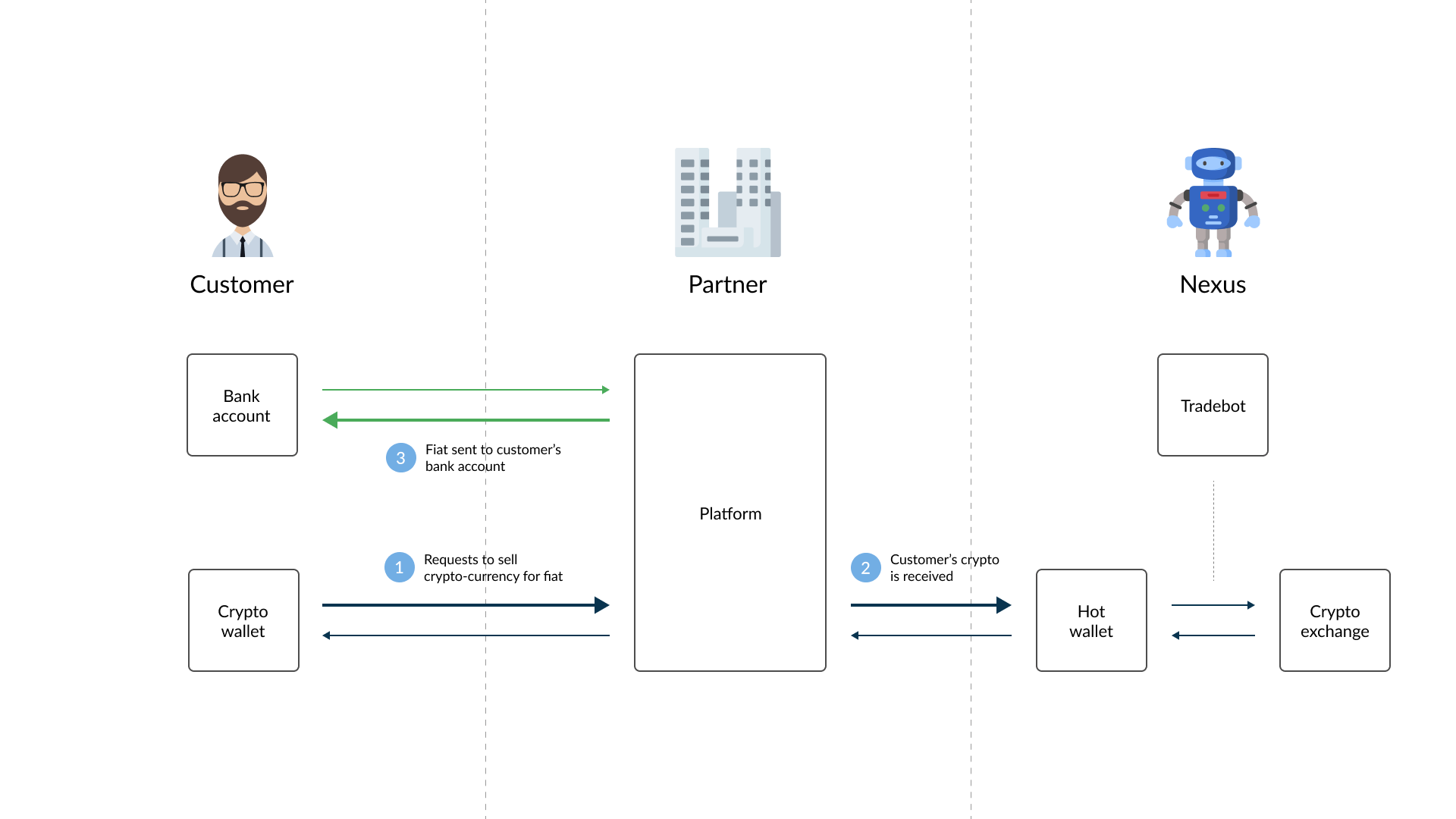
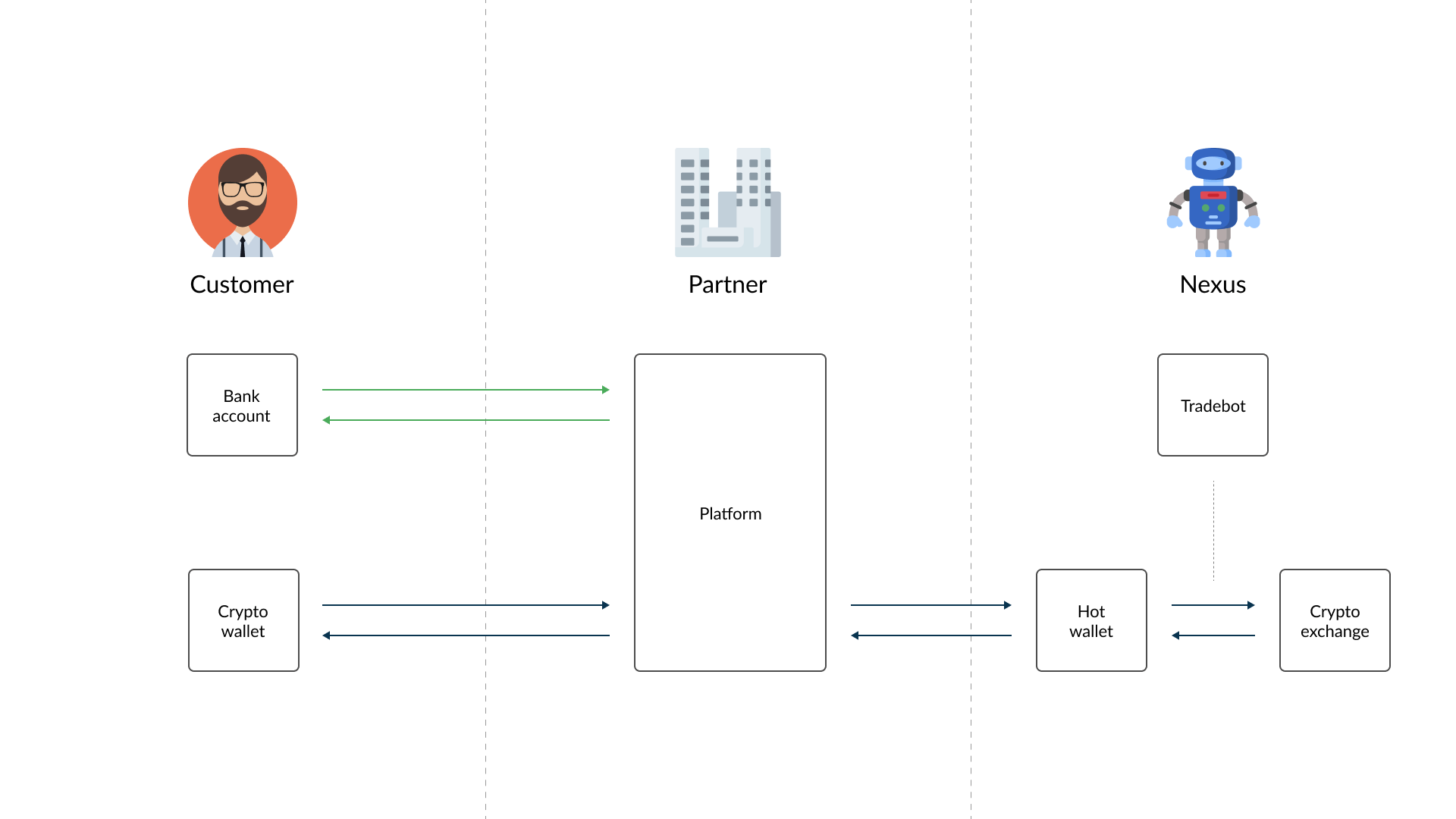
Below you can see a general diagram showing how this model would work for you and your customers.
One important aspect to keep in mind concerns the compliance risk: indeed, in this model the crypto-currency can be received from external sources as well, meaning that an higher risk has to be taken into account and more careful compliance checks should be carried out to avoid incurring into frauds and /or losses.
Account
This term in Nexus has a different meaning from the usual one. When we talk about an Account, we mean a pair of Withdraw and Deposit address, explained in more detail in the subsections below.
Native Accounts
An account using the native crypto of its blockchain, e.g. ETH on Ethereum.
Non-Native Accounts
An account able to use a non-native crypto on its blockchain, e.g. USDT on Ethereum, in addition to its native crypto.
Withdraw address
The withdraw address is the one the Customer provides once they want to have an account on your platform. Basically, this will be their private wallet, where they will receive the crypto-currency bought through the system.
Deposit address
Upon the creation of an Account, Nexus automatically assigns a deposit address to couple together with the withdraw one. This address will be used to receive the crypto send by the customer.
Transactions
Buy
What happens when one of your customer wants to buy crypto-currency on Nexus? The figure below describes on a high level the workflow needed to accomplish that.
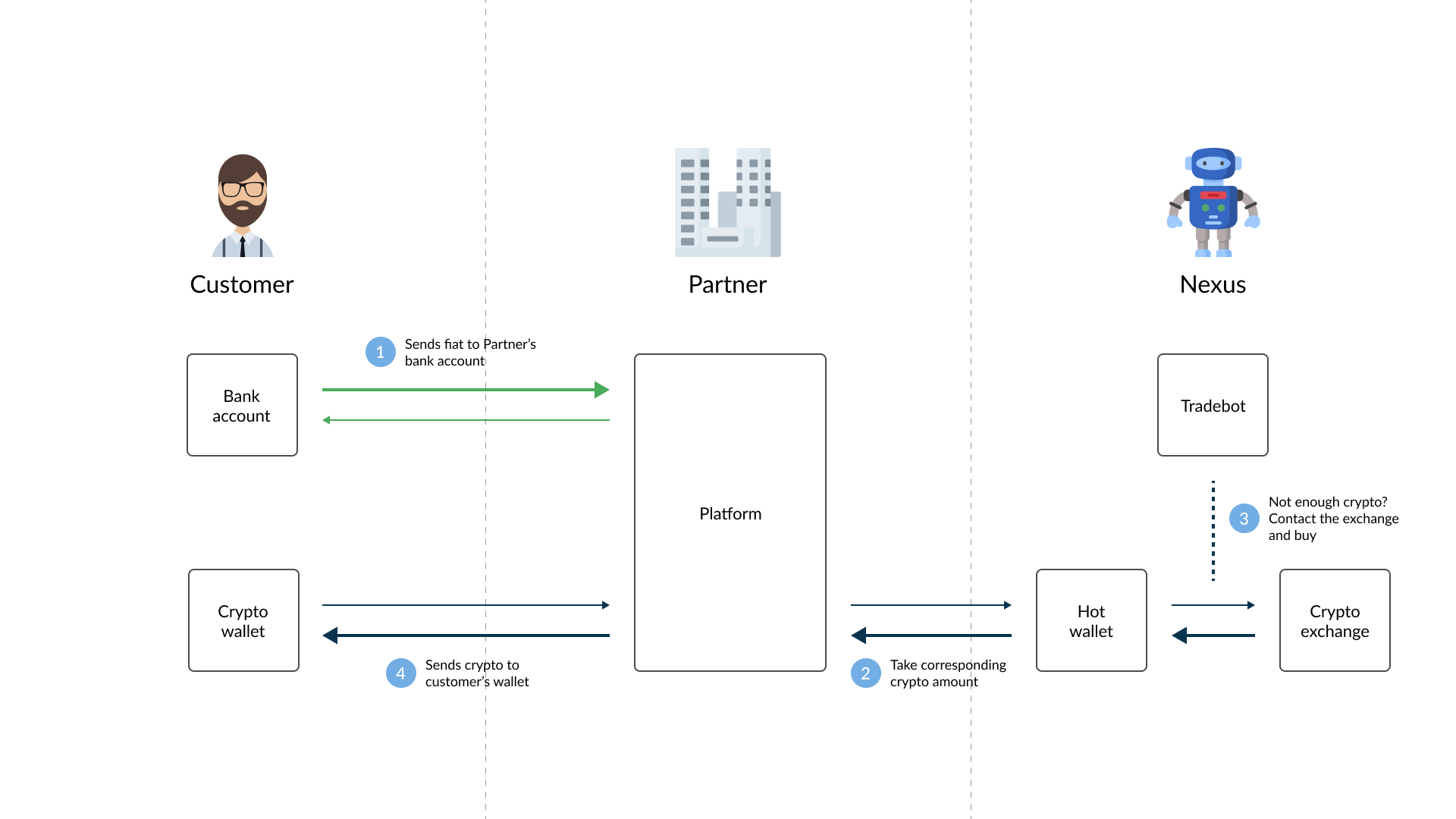
In Nexus, a buy transaction can pass through as many as 8 statuses. However, not all transactions reach the final completed status.
- BuyInitiated: The customer starts the buy process, receiving information on price, fee and crypto-currency amounts. These are temporary "frozen", in order to give the customer the time to execute the payment on their side.
- SendDelay: The crypto-currency amount is locked in the Nexus hot wallet, in order to guarantee the delivery to the customer. To define how the SendDelay status works for every crypto-currency, please refer to the Pricing section.
- Sending: In the same way of the SendDelay status, Sending also reserves the crypto-currency amount on the Nexus hot wallet. This status is reached when the payment signal has been received from the payment method chosen by the customer. Nexus will then execute the blockchain transaction to move the crypto-currency to the customer's wallet.
- ToCancel: The status indicates that the customer has requested to cancel their payment. At this stage, the system is still processing the cancellation, which may take some time. If the cancellation is successful, the transaction status will update to BuyCancelled. However, if the wallet has already processed the payment before the cancellation is finalized, the transaction may still move to BuyCompleted.
- BuyCancelled: This status is automatically assigned after a buy transaction has been Initiated, but in the following 30 minutes the payment signal has not been received from the payment method chosen by the customer.
- BuyCompleted: Once the blockchain transaction has been successfully completed, the status is updated from Sending to BuyCompleted. Once this status is reached, the buy transaction has been finally completed.
- Deleted: The status Deleted is used when the system receives a transaction from a customer, but before the transaction reaches a final status such as BuyCompleted, the customer’s account is not active. In this case, the transaction cannot proceed to completion and is instead marked as deleted.
- ByIncasso: The ByIncasso status indicates that a BUY transaction has been initiated, and the cryptocurrency has already been delivered to the customer, but the payment has not yet been settled. This status is typically set manually by an Operator after a period of non-settlement, indicating that the customer still owes the payment. It serves as a flag for outstanding debt and may impact the customer's ability to initiate new transactions, such as imposing limits or restrictions.
As long as the transaction status is not BuyCompleted, it can be set to Blocked or be Cancelled. The Blocked status can be used to park transactions that are not trusted, even when the payment arrives (typically in the case of fraud). Afterwards, they can be set again to Sending or be Cancelled. The Cancelled status will also be automatically set When Initiated transactions do not receive a payment confirmation within 30 minutes.
NOTE
After each transaction status update, a callback function is offered by Nexus to your backend system. The callback URL can be set for each Payment method in the settings.
Sell
Now that your customers are happy with the profit yielded by the crypto-currencies they bought, it is time for them to cash out and receive the corresponding amount in their bank account. Again, the figure below shows the necessary steps to achieve such goal.
As in the Buy transaction, also selling crypto-currencies is done in steps. The following are the available statuses in Nexus and their meaning.
- SellInitiated: when the customer initiates a Sell transaction, they will receive information about the price, fees and payout value. The information yielded are reserved and "frozen" for an amount of time, which you can define for every payment method. Note: if your customer fails to actually send the crypto within this time-frame, the previously mentioned data will be updated at the time of reception (only if the price change is negative for the broker).
- Confirming: transitional status in which the hot wallet notifies Nexus about the number of confirmations on the blockchain, after the customer has sent the crypto-currency to their deposit wallet.
- ToPayout: when the desired number of confirmations on the blockchain has been reached, the customer may receive the payment on his/her bank account.
- PayoutOnHold: status that can be used for compliance and blockchain latency purposes or if customer's' limits are reached. E.g: to mark transactions that need further investigation or in case a transaction was received too late.
- PayoutConfirming: intermediate status that can be used to implement a 4-eyes security mechanism, with Nexus as a backend.
- Blocked: if the customer chose to use a very low mining fee, it is possible for a transaction to take days or even weeks to get confirmed. If it takes more than 2 hours to get a confirmation, a transaction will be automatically assigned this status. When the confirmation rounds are eventually completed the status will be automatically updated to ToPayout. However, the price will be updated with the current one at time of confirmation (only if the price change is negative for the broker).
- SellCancelled: this status is automatically assigned after a Sell transaction has been Initiated, but in the following 30 minutes no crypto-currency has been transferred.
- SellCompleted: final status that confirm that the Sell transaction has been successfully carried out.
- Deleted: The status Deleted is used when the system receives a transaction from a customer, but before the transaction reaches a final status such as BuyCompleted, the customer’s account is not active. In this case, the transaction cannot proceed to completion and is instead marked as deleted.
- Returned: The status indicated that a transaction with status PayoutOnHold has been sent back to the customer as a crypto transaction. In this case, the value is returned in cryptocurrency with the possibility of being adjusted for the current market price. Once the return is processed, the transaction is marked as Returned
- GiftSending: Transitional status in which Nexus is sending crypto from the hot wallet to the customer’s receiving address.
- GiftCompleted: Final status that confirm that the gift transaction has been successfully carried out.
Customers can also send crypto-currency directly to their Deposit address without creating a Sell transaction. In this case, Nexus will automatically detect a change in the deposit address balance and create a Sell transaction with the Confirming status. The price, fees and payout values are the ones from the moment of reception of such amount.
Merchant
What if for example a store or a person only accepts fiat, but a customer wants to pay in crypto. The Broker solution offers the option to create a Merchant transaction for this specific scenario. Merchant transactions enable a customer to pay a merchant, which only accepts fiat, in crypto. This is possible by allowing the customer to send the crypto amount to the address provided by Nexus. After it has been sent, Nexus recognizes this and updates the transaction with the necessary information to enable you to pay out the corresponding fiat amount to the merchant's bank account, allowing the customer to pay in crypto, and the merchant to be paid in fiat.
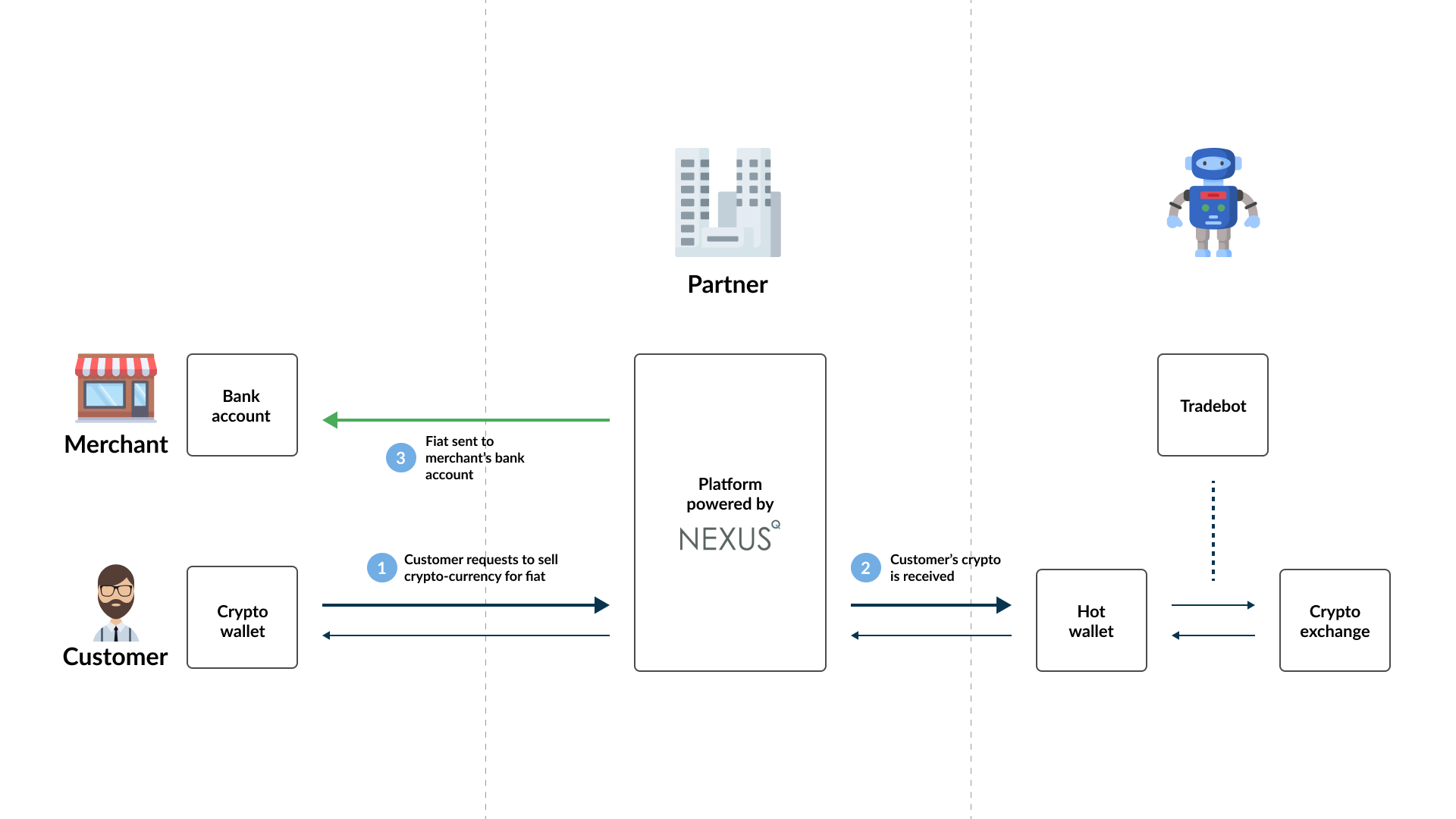
A Merchant transaction is similar to a Sell transaction and share the same transaction statuses as explained with the Sell transaction, but unlike a Sell transactions, a customer cannot send crypto-currency directly to a Deposit address without a Merchant transaction being created first. A Sell and Merchant transaction also differs in the sense that instead of the corresponding fiat amount of the crypto sold by the customer being paid out to the customer, it should be paid out to the merchant.
NOTE
When creating a Merchant transaction, the merchant's account needs to be specified and not the customer. It is not necessary to have an account for the customer in Nexus. A Merchant account can be created manually via the portal by creating a customer with the merchant's details, and selecting to create a Merchant account for that customer on the customer view.
Gift
There might be cases in which you want to reward your customers (loyalty, constructive feedback etc.) with an amount in crypto-currency or fiat currency. In Nexus such operation is possible through a gift transaction, which has to be carried out by one of your Operators. To carry out such operation, the following details need to be provided. Nexus then determines the following for each Gift:
- Fees: Nexus does not calculate any Fees for Gift transaction.
- Price: If the Gift is in Cryptocurrency, Nexus requests the buy price from the Price Exchange.
- Payout Amount: Nexus multiplies the requested amount with the sell price and subtracts the Fees from the result.
Tradebot
The Nexus Tradebot is a service that allows to automate the handling of the balances of the different reserves, namely the exchange, hot wallet and coldstore reserves. To set it up according to your preference, follow the steps outlined below.
- Navigate to the Traderoom and click on the Tradebot settings link

- On this page you will see an overview of all the crypto-currencies you currently support. For each one, you could click on the edit icon and set the parameters to the values you deem correct.

Further explanation regarding the settings you can find in the crypto-currency section:
- Exchange/currency tradepair: choose which exchange and fiat currency to be used by the Tradebot for this particular crypto-currency.
- Balance target value: the amount of Euro (combining both confirmed and unconfirmed balances) you aim to hold in your hot wallet reserves. Typically, this value is equal to the aggregated normal expected buy transaction value in a day. This value represents the open market position, as it is exposed to price fluctuation risk (when market prices drop, there will be a loss on this position).
- Balance wobble value: an amount that is allowed to deviate from the balance target (e.g. 100 ± 10). This bandwidth also allows the internal settlement of buy and sell transactions, thus monetizing the spread benefit. Only in the case of the balance exceeding the wobble limits, the crypto is traded on the exchange. As a result, the system will therefore buy when market prices are dropping and sell when market prices are rising, according to customers' behavior.
- Min/max trading value: minimum and maximum amount in fiat currency of an order through the exchange service. You should at least set the minimum value to the amount required by the exchange service provider.
- Min/max transfer value: range of transaction amount (in fiat currency) between hot wallet and exchange reserves. Use this option to optimise losses due to fees.
Tradebot and Exchange behavior
To explain the behavior related to the tradebot and the exchange, we will go through all four tradebot actions, in the order they are executed.
Note for the explanations below:
- For the tradebot configuration settings BalanceTargetValue, BalanceWobbleValue, MinTradeValue, MaxTradeValue, MinTransferValue and MaxTransferValue, assume we are referring to their amounts converted from your fiat base currency to the relative crypto, when we refer to the following terms respectively: BalanceTargetCryptoValue BalanceWobbleCryptoValue, MinTradeCryptoValue, MaxTradeCryptoValue, MinTransferCryptoValue and MaxTransferCryptoValue.
- We assume the MinTradeCryptoValue, MaxTradeCryptoValue, MinTransferCryptoValue and MaxTransferCryptoValue are all more than 0.
- If the minimum confirmed crypto balance of the hot wallet is ever more than BalanceTargetCryptoValue minus the BalanceWobbleCryptoValue, then we set the minimum confirmed crypto balance of the hot wallet equal to the BalanceTargetCryptoValue minus the BalanceWobbleCryptoValue. And if this value is less than 0, then we set the minimum confirmed crypto balance of the hot wallet as 0.
- The confirmed crypto hot wallet balance is the confirmed administrative calculated hot wallet balance.
- The total crypto hot wallet balance is the administrative calculated hot wallet balance including incoming unconfirmed sells and transfers.
- The confirmed crypto hot wallet reserve is the confirmed measured reserve visible in the portal’s traderoom.
- We set the status to Unbalanced when the difference between reserve and balance exceeds the smallest unit (satoshi, wei etc).
- The total exchange crypto reserve is the available crypto reserve on the exchange, plus the locked crypto reserve on the exchange, both visible in the portal’s traderoom.
- The available exchange crypto reserve is the available crypto reserve on the exchange, visible in the portal’s traderoom.
- The total exchange currency reserve is the available fiat reserve of this tradepair on the exchange, plus the locked fiat reserve of this tradepair on the exchange, both visible in the portal’s traderoom.
- The available exchange currency reserve is the available fiat reserve on the exchange, visible in the portal’s traderoom.
- There is a delay between finishing a customer’s buy transaction and the actual sending of crypto from the hot wallet. The delayed crypto being send is the amount already subtracted from the administrative balance, but not yet from the reserve.
1. The hot wallet crypto balance is too high
When the total hot wallet crypto balance is more than the BalanceTargetCryptoValue plus BalanceWobbleCryptoValue and the confirmed hot wallet crypto balance is more or equal to BalanceTargetCryptoValue and also the confirmed hot wallet crypto balance minus the delayed crypto being send is more than the minimum confirmed crypto balance of the hot wallet , then a crypto amount will be transferred to the exchange.
How is the crypto amount to be transferred calculated?
The transfer amount is calculated as the total hot wallet crypto balance minus the BalanceTargetCryptoValue. If the confirmed hot wallet crypto reserve minus the transfer amount is less than the minimum confirmed crypto balance of the hot wallet , then the transfer amount now equals the confirmed hot wallet crypto reserve minus the minimum confirmed crypto balance of the hot wallet . Else, it stays the same. Lastly, if the transfer amount is more than the MaxTransferCryptoValue, set it equal to the MaxTransferCryptoValue, else leave it unchanged. If the transfer amount is more or equal to the MinTransferCryptoValue, then we transfer the transfer amount from the hot wallet to the exchange.
2. The hot wallet crypto balance is too low
When the total hot wallet crypto balance is less than the BalanceTargetCryptoValue minus BalanceWobbleCryptoValue or/and the total hot wallet crypto balance minus the delayed crypto being send is less than the minimum confirmed crypto balance of the hot wallet , then a crypto amount will be transferred from the exchange.
How is the crypto amount to be transferred calculated?
The transfer amount is calculated as the BalanceTargetCryptoValue minus the total hot wallet crypto balance. If the delayed crypto being send is more than the transfer amount and the total hot wallet crypto balance minus the delayed crypto being send is less than the minimum confirmed crypto balance of the hot wallet , then the transfer amount now equals the delayed crypto being send. Else, leave it unchanged. If the transfer amount is more than the available crypto exchange, then the transfer amount equals the available crypto exchange. Else, it stays the same. Lastly, if the transfer amount is more than the MaxTransferCryptoValue, set it equal to the MaxTransferCryptoValue, else leave it unchanged. If the transfer amount is more or equal to the MinTransferCryptoValue, then we transfer the transfer amount from the exchange to the hot wallet.
3. The Physical Crypto Balance is too high
When the total hot wallet crypto balance plus the total exchange crypto reserve is more than the BalanceTargetCryptoValue plus the BalanceWobbleCryptoValue and the total hot wallet crypto balance minus the delayed crypto being send is more than the minimum confirmed crypto balance of the hot wallet , then execute a Sell trade on the Primary Exchange.
How is the crypto amount to be traded calculated?
The trade amount is calculated as the difference of total hot wallet crypto balance plus the total exchange crypto reserve and the BalanceTargetCryptoValue. If the trade amount is more than the available exchange crypto reserve, then the trade amount equals the available exchange crypto reserve. Else, it stays the same. Lastly, if the trade amount is more than the MaxTradeCryptoValue, set it equal to the MaxTradeCryptoValue, else leave it unchanged. Only if the trade amount at this stage is more than the MinTradeCryptoValue, do we execute a Sell trade on the Primary Exchange for that amount.
4. The Physical Crypto Balance is too low
When the total hot wallet crypto balance is less than the BalanceTargetCryptoValue minus the BalanceWobbleCryptoValue and the total exchange crypto reserve is less than the BalanceTargetCryptoValue minus the total hot wallet crypto balance; or the delayed crypto being send is more than the total exchange crypto reserve and the total hot wallet crypto balance minus the delayed crypto being send is less than the MinTransferCryptoValue, then execute a Buy trade on the Primary Exchange.
How is the crypto amount to be traded calculated?
The trade amount is calculated as the difference of BalanceTargetCryptoValue and the sum of total hot wallet crypto balance and the total exchange crypto reserve. If the delayed crypto being send minus the total exchange crypto reserve is more than the trade amount and the total hot wallet crypto balance minus the delayed crypto being send is less than the MinTransferCryptoValue, then the trade amount equals the delayed crypto being send minus the total exchange crypto reserve. Then, if the total hot wallet crypto balance is more than BalanceTargetCryptoValue plus BalanceWobbleCryptoValue, then the trade amount equals the difference of the delayed crypto being send and total hot wallet crypto balance minus BalanceTargetCryptoValue. Next, if the trade amount, multiplied by the crypto price, is more than 99% of the available exchange currency reserve, the trade amount equals 99% of the available exchange currency reserve, divided by the crypto price (we leave 1% to allow for fees). Else, it remains unchanged. Now, if the trade amount is more than the MaxTradeCryptoValue, set it equal to the MaxTradeCryptoValue, else leave it unchanged. Then, if the confirmed crypto hot wallet reserve is more than the total hot wallet crypto balance and the confirmed crypto hot wallet reserve minus the delayed crypto being send is more than the BalanceTargetCryptoValue plus BalanceWobbleCryptoValue, then the trade amount is set as 0. Only if the trade amount at this stage is more than the MinTradeCryptoValue, do we execute a Buy trade on the Primary Exchange for that amount.
Possible reasons why the tradebot is not executing any actions currently for a specific crypto
- The tradebot is not set to active for that specific crypto.
- There are still open active orders or withdraws in Nexus.
- The previous finished order is less than 1 minute old on the Exchange.
- There are missing deposits in HotWallet (withdraw from exchange without corresponding completed deposit in hotwallet).
- There are missing deposits on Exchange (withdraw from hotwallet without corresponding deposit on exchange).
- The exchange price or internal price is unknown or equals zero.
- The exchange price and internal price differ more than 25%
- The MaxTradeCryptoValue equals 0 or the MaxTradeCryptoValue is less than the MinTradeCryptoValue – bad parameters.
- The MaxTransferCryptoValue equals 0 or the MaxTransferCryptoValue is less than the MinTransferCryptoValue – bad parameters.
- The confirmed crypto hot wallet reserve, the confirmed crypto hot wallet balance, the total crypto balance (including incoming unconfirmed sells and transfers) and/or the value of the delayed crypto being send to the hot wallet is less than 0 - server wallet is inconsistent.
- The total crypto administrative balance (including incoming unconfirmed sells and transfers) is less than the confirmed crypto hot wallet balance - server wallet is inconsistent.
- The confirmed crypto hot wallet reserve is less than 99% of the confirmed crypto hot wallet balance - server wallet is inconsistent, calculated reserve and real hot wallet reserve differ too much.
- The minimum confirmed crypto balance of the hot wallet, BalanceTargetCryptoValue, BalanceWobbleCryptoValue is less than 0 and/or the BalanceWobbleCryptoValue is more than BalanceTargetCryptoValue – bad parameters.
- The total exchange crypto reserve and/or the total exchange currency reserve is less than 0 - exchange balances negative or not up to date.