Customer
A Customer in Nexus refers to the end users of your platform — the individuals or businesses using the service you are building with Nexus.
Statuses
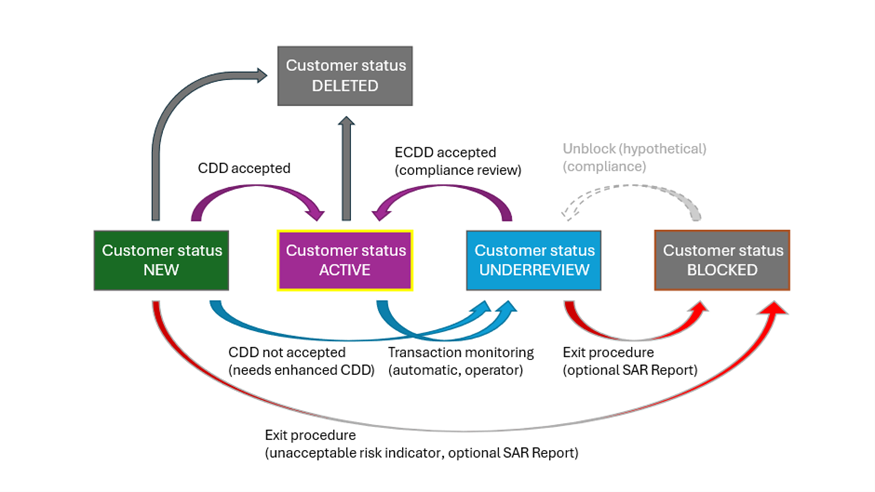
The image above illustrates the standard customer status change flows. While the Nexus Portal and API support these status changes, they do not include the underlying compliance processes (see note below). Partners must implement these processes based on their specific needs and regulatory requirements, as they fall outside the scope of Nexus API or Portal functionality. Customers are typically created with either NEW or ACTIVE status.
Note
- CDD: Customer Due Diligence refers to the process by which financial institutions, banks, and other regulated entities assess and verify the identity of their clients and evaluate the potential risks of illegal activities, such as money laundering or fraud, associated with them.
- ECCD: Enhanced Customer Due Diligence (ECDD) is a more thorough and detailed process applied to customers who pose a higher risk of engaging in illicit activities, such as money laundering, terrorist financing, or corruption.
- SAR: A Suspicious Activity Report is a formal report submitted by financial institutions to regulatory authorities when there is a suspicion that a customer may be involved in illegal activities, such as money laundering, fraud, or other financial crimes.
In Nexus, a customer can have the following statuses:
NEW
A customer with a status of NEW is in the process of Customer Due Diligence. This customer already exists in Nexus but requires additional verification. The only actions available for a customer with a status of NEW is to progress to a different status.
ACTIVE
A customer with a status of ACTIVE can access transactions functionality within their Trust Level limits.
UNDERREVIEW
A customer with a status of UNDERREVIEW indicates that a compliance decision is required. Depending on the outcome of the decision, the customer status should be changed to ACTIVE or BLOCKED. An UNDERREVIEW status is considered a temporary status, pending the outcome of the compliance decision.
BLOCKED
When a Customer Due Diligence (review) results in an unacceptable risk, the customer shall be BLOCKED. A BLOCKED status is considered an end status showing the customer relation was unvoluntary terminated. A customer can be unblocked if you have the appropriate permission.
DELETED
A customer with a status of NEW or ACTIVE can be DELETED. This status is considered an end status showing the customer relation was ended voluntary. Once a customer is marked as Deleted, can no longer be updated.
Actions
The table below lists the available actions for a customer dependent on their current status and business model.
Broker
| Action | NEW | ACTIVE | UNDERREVIEW | BLOCKED | DELETED |
|---|---|---|---|---|---|
| Create new account | ✔️ | ||||
| Delete existing account | ✔️ | ✔️ | ✔️ | ✔️ | |
| Update existing account | ✔️ | ✔️ | ✔️ | ✔️ | |
| Edit customer | ✔️ | ✔️ | ✔️ | ||
| Activate account | ✔️ | ✔️ | ✔️ | ||
| Create Non-native account | ✔️ | ✔️ | |||
| Simulate-Initiate Buy transaction* | ✔️ | ✔️ | |||
| Simulate-Initiate Sell transaction* | ✔️ | ✔️ | |||
| Initiate Gift transaction** | ✔️ | ||||
| Initiate Merchant transaction | ✔️ | ✔️ |
*It is possible to simulate a buy/sell transaction for a customer marked as New. However, initiating a transaction requires the customer to be Active.
**For the broker model, you can initiate a gift to an active customer only via the portal.
Custodian
| Action | NEW | ACTIVE | UNDERREVIEW | BLOCKED | DELETED |
|---|---|---|---|---|---|
| Create new account | ✔️ | ||||
| Delete existing account | ✔️ | ✔️ | ✔️ | ||
| Update existing account | ✔️ | ✔️ | ✔️ | ||
| Edit customer | ✔️ | ✔️ | ✔️ | ||
| Create Non-native account | ✔️ | ✔️ | |||
| Simulate-Initiate Buy | ✔️ | ||||
| Simulate-Initiate Sell | ✔️ | ||||
| Simulate-Initiate Send Out | ✔️ | ||||
| Simulate-Initiate Send Internal | ✔️ | ||||
| Simulate-Initiate Gift | ✔️ | ||||
| Simulate-Initiate Swap | ✔️ | ||||
| Initiate Payment request | ✔️ | ||||
| Create Send To Bucket | ✔️ | ||||
| Create Clawback | ✔️ | ✔️ | ✔️ | ✔️ | ✔️ |
Customer Persons
For compliance purposes, Nexus supports attaching a list of key persons to a business customer. These persons represent individuals who are related to the customer in a specific legal or operational capacity.
Note
Customer persons can only be added to customers that are marked as a business customer. Attempting to add a person to a non-business customer returns an error.
Person types
Each person must be assigned one or more of the following types:
| Type | Description |
|---|---|
Director |
A director of the business. |
UltimateBeneficialOwner |
An individual who ultimately owns or controls the business. Requires an ownershipPercentage of 25% or more (expressed as a decimal, for example 0.39 represents 39%). |
PseudoUltimateBeneficialOwner |
A person treated as an ultimate beneficial owner for compliance purposes without meeting the standard threshold. |
AuthorisedRepresentative |
A person authorized to act on behalf of the business. |
Other |
Any other relevant person not covered by the types above. |
Ownership percentage
The ownershipPercentage field is relevant for UltimateBeneficialOwner persons only. It is expressed as a decimal fraction (for example, 0.39 represents 39%). The following rules apply:
- A person of type
UltimateBeneficialOwnerrequires anownershipPercentagebetween0.25(25%) and1.0(100%), inclusive. - Persons of other types must not have an
ownershipPercentageabove0.25(25%).
Person statuses
A person record has one of the following statuses:
| Status | Description |
|---|---|
Active |
The person is active and returned in list results. |
Deleted |
The person has been soft-deleted and is no longer returned in list results. |
Deleting a person sets its status to Deleted. Deleted persons are not returned by the list endpoint.