Custodian
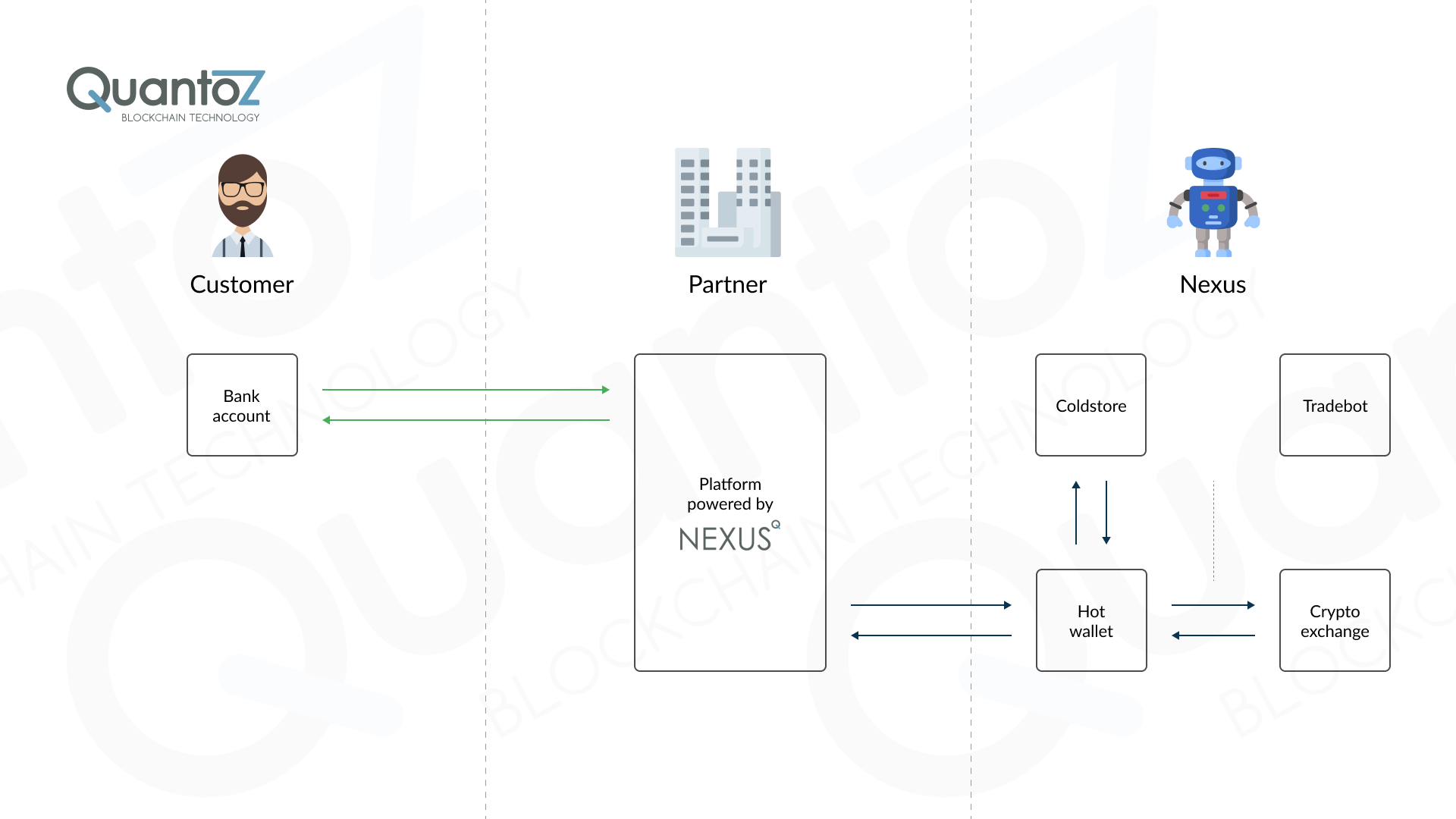
In the custodian “savings-only” model, you can provide customers a secure crypto saving/investing service. Such service enables customers interested in investing part of their savings in crypto-currencies to easily purchase them and have a service provider (you in this case) to hold their investments until they decide to withdraw. Given the value proposition of this use case, a coldstore wallet or service is mandatory to keep the majority of the crypto safe.
In practice you will have in your Nexus reserves (exchange, hot wallet and coldstore) nearly the same amount that you promised your customers to hold for them. This allows to swiftly respond to their withdraw requests, avoiding delays and therefore a negative customer experience. We use the term wobble in Nexus to indicate the planned deviation from the actual reserve you should hold, in order to allow for some gains over the spread. The reserve on the exchange is limited to intra-day (re)balancing requirements.
An interesting aspect is that in this model, compared to the broker one, both the buy and sell transactions (meaning the customer exchanging fiat currency for crypto-currency) are off-chain, since they are merely a bookkeeping exercise. For instance, if your customer buys 0.5 Bitcoins his/her balance will be updated accordingly, without the need for him/her to possess a digital wallet where to store them and therefore removing the need for the on-chain transactions.
What if the cumulative reserve amount is lower than the one you promise to hold for your customers? You can either choose to manually transfer the difference to one of your reserves or activate the Nexus Tradebot to automatically handle the balances according to the your preferences. Both internal and external pricing can be used to adjust the balance, however it's important to note that with external pricing all transactions are executed back-to-back on the exchange.
Since this model behaves like a closed crypto system, where the source and destination addresses are the only possible trusted exchanges, the compliance risk is lower than the one of the broker model.
Account
In the custodian model, an account represents your customer's entity and may support only native or also non-native crypto. The account can be of 4 types:
- Accounts with no addresses: Can only do off-chain transactions, it does not have a withdraw and deposit address.
- Accounts with a send address: Can do off-chain transactions and only on-chain send transactions, it has a withdraw address (provided by Customer). The account cannot receive any crypto amount outside of Nexus but it can send to any address on the network.
- Accounts with a receive address: Can do off-chain transactions and only on-chain receive transactions, it has a deposit address (provided by Nexus). The account cannot send any crypto amount outside of Nexus but it can receive from any address on the network.
- Accounts that have both addresses: Can do off-chain transactions and on-chain receive/send transactions, it has a deposit address (provided by Nexus) and a withdraw address (provided by Customer), it can send and receive from/to any address on the network.
Native Accounts
An account using the native crypto of its blockchain, e.g. ETH on Ethereum.
Non-Native Accounts
An account able to use a non-native crypto on its blockchain, e.g. USDT on Ethereum, in addition to its native crypto. This requires specific setup within Nexus.
Transactions
Buy
Since there is no on-chain transaction, the change in the balance amount is merely updated in the customer's record. It is immediately created with a completed status.
Sell
The process to sell cryptocurrency in the Custodian model is off-chain transaction. It is immediately created with a completed status. The handling and use of this status can be managed within your own backend system.
ReceiveIn Transactions
A ReceiveIn is an on-chain transaction that allows a client's customer to send cryptocurrency from an external source (such as an exchange or a private wallet) to their address within Nexus.
Once the transaction is confirmed on the blockchain, the customer’s custodian balance is updated to reflect the received crypto amount.
Types of ReceiveIn Transactions
Nexus supports two types of ReceiveIn transactions:
1. Fixed Receive Address (Customer Account Creation)
When a new account is created with the generateReceiveAddress flag set to true, a fixed crypto address is generated for the customer.
- Any crypto sent to this address and confirmed on the blockchain automatically increases the customer’s custodian balance by the received amount.
- This address can be reused an unlimited number of times.
2. Payment Request (Single-Use Address)
Customers can generate a payment request when they wish to receive a specific or variable amount of crypto.
- A fixed payment request specifies the exact amount to be received.
- An open payment request allows any amount to be sent.
In both cases, Nexus creates a unique crypto address for the transaction. Once the blockchain confirms receipt, the customer’s custodian balance is updated.
Each payment request address can only be used once.
ReceiveIn Transaction Lifecycle
Because ReceiveIn is an on-chain process, the transaction lifecycle follows these steps:
1. Initiation
- The customer generates a payment request.
- A transaction is created in Nexus with the status
Initiated. - The customer then sends the crypto to the generated address.
2. Completion
- Once Nexus detects the transaction on the blockchain, the transaction status changes to
Completed.
3. Blocked Transactions
A transaction may be automatically marked as Blocked in the following cases:
- The amount received on the blockchain does not match the requested amount.
- Nexus detects a blockchain transaction to a unique generated customer address but cannot find a corresponding transaction record within the system.
Operator Actions for Blocked Transactions
When a transaction is marked as Blocked, Nexus provides two resolution options for the operator:
1. Re-Initiate:
Change the transaction status to Confirming, prompting Nexus to attempt to complete the transaction again.
2. Cancel: Permanently cancel the transaction to prevent further processing.
SendOut
A SendOut is an on-chain transaction where a customer transfers cryptocurrency from their Nexus address to an external destination (such as an exchange or a private wallet).
The transaction is not executed immediately. Instead, it follows a defined lifecycle:
- When the customer initiates a SendOut, the transaction is created in Nexus with the status
Sending. - Once the transaction is successfully executed and confirmed on the blockchain, its status changes to
Completed. - After confirmation, the customer’s custodian balance is decreased by the sent crypto amount.
The final status of a successfully processed SendOut transaction is Completed.
SendInternal
A SendInternal is an off-chain transaction where one customer can transfer crypto from their custodian wallet to another customer who also holds a custodian wallet within Nexus. Since the transfer takes place entirely within the custodian system, it does not require blockchain confirmation and is processed instantly. Once the transfer is executed, the sender’s custodian balance is decreased and the recipient’s balance is increased accordingly, with the final status marked as Completed.
Swap
A Swap is a transaction where a customer can exchange one cryptocurrency (e.g. ALGO) for another (e.g. XLM) directly within Nexus. Once the swap is executed, the customer’s balance is updated by deducting the sold asset and crediting the purchased asset, with the final status marked as Completed.
Gift
The status Gift is used when you want to reward a customer by increasing their crypto balance without reducing their fiat balance. This allows you to credit additional crypto to the customer’s custodian wallet as a bonus or reward, independent of any fiat deduction.
Clawback
The status ClawBack is used to decrease a customer’s crypto balance without increasing their fiat balance. It represents a reversal where crypto that was previously credited to the customer (for example, from a purchase) is taken back by the system.
Transactions Statuses
Each transaction in Nexus follows a defined lifecycle represented by a set of statuses.
These statuses indicate the current state of a transaction — from initiation to completion or cancellation.
Initiated
The transaction has been created in the system but not yet processed on-chain.
- For ReceiveIn, this occurs when a customer generates a payment request.
- For SendOut, this occurs when the customer initiates a crypto transfer request.
- At this stage, the transaction is pending customer or system action to proceed.
Sending
The transaction has been submitted for processing and is pending blockchain confirmation.
- Applies primarily to SendOut transactions.
- Indicates that the transaction has been broadcast to the network but not yet confirmed.
Confirming
The transaction has been detected on the blockchain and is awaiting sufficient confirmations.
- Commonly applies to ReceiveIn transactions after Nexus identifies the incoming crypto on-chain.
- Once the required number of confirmations is reached, the status transitions to
CompletedorBlocked.
Completed
The transaction has been successfully confirmed and finalized. This is the final successful state of a transaction.
Blocked
The transaction cannot be completed automatically due to a validation or reconciliation issue.
Typical scenarios include:
- The received amount differs from the expected amount.
- A transaction is detected on a unique generated customer address but no corresponding record exists in Nexus.
- Duplicate on-chain transactions (e.g., a customer sending funds twice to a single-use address).
Operators can manually review and either Re-Initiate or Cancel the transaction.
ToCancel
The transaction has been flagged for cancellation but has not yet been marked as fully Cancelled.
This is a transitional state while the system or operator completes the cancellation process.
Cancelled
The transaction has been explicitly stopped and will not proceed further.
- The transaction is not processed on-chain.
- No balance updates occur.
- Represents a final state for halted transactions.
Custodian Limit
The Custodian Limit can be set per Trust Level and has the following behaviour per transaction type:
- Buy: when the Custodian Limit is reached, the customer cannot create any more Buy transactions
- Sell: when the Custodian Limit is reached, the customer can create Sell transactions as long as (daily/monthly/yearly/lifetime) Sell limit is not violated
- SendInternal: when the Custodian Limit of the receiver is reached, the sender cannot create SendInternal transactions
- ReceiveIn: ReceiveIn transactions are not affected by the Custodian Limit
- SendOut: SendOut transactions are not affected by the Custodian Limit
- Swap: Swap transactions are not affected by the Custodian Limit
Tradebot
The Nexus Tradebot is a service that allows to automate the handling of the balances of the different reserves, namely the exchange, hot wallet and coldstore reserves. To set it up according to your preference, follow the steps outlined below.
- Navigate to the Traderoom and click on the Tradebot settings link

- On this page you will see an overview of all the crypto-currencies you currently support. For each one, you could click on the edit icon and set the parameters to the values you deem correct.

Further explanation regarding the settings you can find in the crypto-currency section:
- Exchange/currency tradepair: choose which exchange and fiat currency to be used by the Tradebot for this particular crypto-currency.
- Min/max hot wallet value: similar to the point above, this setting defines the min and max amount of crypto-currency to be kept on the hot wallet. If both values are set to 0, the Tradebot assumes that all transactions should be carried out between the exchange and coldstore reserves directly.
- Min/max exchange value: sets the min and max amount of crypto-currency that should be kept on the exchange reserve.
- Balance wobble value: an amount that is allowed to deviate from the balance target (e.g. 100 ± 10). This bandwidth also allows the internal settlement of buy and sell transactions, thus monetizing the spread benefit. Only in the case of the balance exceeding the wobble limits, the crypto is traded on the exchange. As a result, the system will therefore buy when market prices are dropping and sell when market prices are rising, according to customers' behavior.
- Min/max trading value: minimum and maximum amount in fiat currency of an order through the exchange service. You should at least set the minimum value to the amount required by the exchange service provider.
- Min/max transfer value: range of transaction amount (in fiat currency) between hot wallet and exchange reserves. Use this option to optimise losses due to fees.
Tradebot and Exchange behavior
In an effort to explain the behavior related to the tradebot and the exchange, we will go through all six tradebot actions, in the order they are executed, and for each, cover all the different scenarios listed below:
- Exchange behavior with a hot wallet and no cold store
- Exchange behavior with a hot wallet and a cold store
- Exchange behavior with a cold store and no hot wallet
- Exchange behavior with no hot wallet and no cold store
Note for the explanations below:
- If the BalanceWobbleValue tradebot configuration settings is ever less than the MinTradeValue tradebot configuration settings, then we set the BalanceWobbleValue equal to the MinTradeValue.
- For the tradebot configuration settings MinExchangeValue, MaxExchangeValue, Min. HotWallet Value, Max. HotWallet Value, BalanceWobbleValue, MinTradeValue, MaxTradeValue, MinTransferValue and MaxTransferValue, assume we are referring to their amounts converted from your fiat base currency to the relative crypto, when we refer to the following terms respectively: MinExchangeCryptoValue, MaxExchangeCryptoValue, MinHotWalletCryptoValue, MaxHotWalletCryptoValue, BalanceWobbleCryptoValue, MinTradeCryptoValue, MaxTradeCryptoValue, MinTransferCryptoValue and MaxTransferCryptoValue.
- MidExchangeCryptoValue is equal to half of the sum of the MinExchangeCryptoValue and the MaxExchangeCryptoValue.
- MidHotWalletCryptoValue is equal to half of the sum of the MinHotWalletCryptoValue and the MaxHotWalletCryptoValue.
- We assume the MinTradeCryptoValue, MaxTradeCryptoValue, MinTransferCryptoValue and MaxTransferCryptoValue are all more than 0.
- When we refer to a hot wallet being set up correctly, we refer to the below conditions being met:
- A hot wallet is set up.
- The MinHotWalletCryptoValue or/and MaxHotWalletCryptoValue is more than 0.
- The MaxHotWalletCryptoValue is more than the MinHotWalletCryptoValue.
- The MaxHotWalletCryptoValue is more than the MinHotWalletCryptoValue plus the MinTransferCryptoValue
- The confirmed crypto hot wallet balance is the confirmed administrative calculated hot wallet balance.
- The total crypto hot wallet balance is the administrative calculated hot wallet balance including incoming unconfirmed sells and transfers.
- The confirmed crypto hot wallet reserve is the confirmed measured reserve visible in the portal’s traderoom.
- We set the status to Unbalanced when the difference between reserve and balance exceeds the smallest unit (satoshi, wei etc).
- The total exchange crypto reserve is the available crypto reserve on the exchange, plus the locked crypto reserve on the exchange, both visible in the portal’s traderoom.
- The available exchange crypto reserve is the available crypto reserve on the exchange, visible in the portal’s traderoom.
- The total exchange currency reserve is the available fiat reserve of this tradepair on the exchange, plus the locked fiat reserve of this tradepair on the exchange, both visible in the portal’s traderoom.
- The available exchange currency reserve is the available fiat reserve on the exchange, visible in the portal’s traderoom.
- The Custodian Crypto Balance is the custodian position’s customer crypto balance, visible in the portal’s traderoom.
- There is a delay between finishing a customer’s buy transaction and the actual sending of crypto from the hot wallet. The amount is already subtracted from the custodian balance, but not yet from the reserve so we remove that amount, the delayed crypto, from the Physical Crypto Balance in our calculation below, so that it is not taken into account. Also, if the tradebot configuration setting Proprietary Amount does not equal 0, then take note that we remove that value from the Physical Crypto Balance in our calculation below, so that it is not taken into account. Hence the Physical Crypto Balance is equal to the total exchange crypto reserve, plus the total crypto reserve in the cold store, plus the total crypto hot wallet balance, minus the Proprietary Amount, minus the delayed crypto.
1. The exchange crypto reserve is too low
When the total exchange crypto reserve is lower than the MinExchangeCryptoValue and also the Physical Crypto Balance is more than the Custodian Crypto Balance minus the BalanceWobbleCryptoValue, then a crypto amount will be transferred to the exchange.
Exchange behavior with a hot wallet and no cold store
If there is a hot wallet set up, but no cold store, then a crypto amount will be transferred from the hot wallet to the exchange.
Exchange behavior with a hot wallet and a cold store
If there is both a hot wallet and cold store set up, we will always transfer from the hot wallet to the exchange, even if no crypto is available to send from the hot wallet.
Exchange behavior with a cold store and no hot wallet
If there is a cold store set up, but no hot wallet, we send the client a notification to request that a crypto amount be manually transferred from the cold store to the exchange.
Exchange behavior with no hot wallet and no cold store
If there is no hot wallet nor cold store set up, nothing will happen when the total exchange crypto reserve is lower than the MinExchangeCryptoValue.
How is the crypto amount to be transferred calculated?
If a hot wallet is set up correctly, the transfer amount is calculated by first checking if the total exchange crypto reserve, plus the MaxTransferCryptoValue, is more than the MidExchangeCryptoValue. If it is, the transfer amount is equal to the MidExchangeCryptoValue minus the total exchange crypto reserve. Else it is equal to the MaxTransferCryptoValue. Then, if the confirmed crypto hot wallet balance minus the transfer amount is less than the MinHotWalletCryptoValue, then the transfer amount now equals the confirmed crypto hot wallet balance minus the MinHotWalletCryptoValue. Else, it stays the same. Lastly, if the transfer amount is more or equal to the MinTransferCryptoValue, we transfer that crypto amount from the hot wallet to the exchange.
When no hot wallet is set up at all, but there is a cold store set up, and the total crypto reserve in the cold store is more than the MinTransferCryptoValue, then the transfer amount is calculated by first checking if the total exchange crypto reserve, plus the MaxTransferCryptoValue, is more than the MidExchangeCryptoValue. If it is, the transfer amount is equal to the MidExchangeCryptoValue minus the total exchange crypto reserve. Else it is equal to the MaxTransferCryptoValue. If the transfer amount is more than the total crypto reserve in the cold store, then the transfer amount is set equal to the total crypto reserve in the cold store. Else, it remains unchanged. Then, if the transfer amount is more or equal to the MinTransferCryptoValue, a notification will be sent to the client to request that the transfer amount be manually transferred from the cold store to the exchange.
2. The exchange crypto reserve is too high
When the total exchange crypto reserve is more than the MaxExchangeCryptoValue and also the Physical Crypto Balance is less than the Custodian Crypto Balance plus the BalanceWobbleCryptoValue, then a crypto amount will be transferred from the exchange.
Exchange behavior with a hot wallet and no cold store
If there is a hot wallet set up, but no cold store, then a crypto amount will be transferred from the exchange to the hot wallet.
Exchange behavior with a hot wallet and a cold store
If there is both a hot wallet and cold store set up, we will always transfer from the exchange to the hot wallet.
Exchange behavior with a cold store and no hot wallet
If there is a cold store set up, but no hot wallet, then a crypto amount will be transferred from the exchange to the cold store.
Exchange behavior with no hot wallet and no cold store
If there is no hot wallet nor cold store set up, nothing will happen when the total exchange crypto reserve is more than the MaxExchangeCryptoValue.
How is the crypto amount to be transferred calculated?
The transfer amount is calculated by first checking if the total exchange crypto reserve minus the MaxTransferCryptoValue is less than the MidExchangeCryptoValue. If it is, the transfer amount is equal to the total exchange crypto reserve minus the MidExchangeCryptoValue. Else, it is equal to the MaxTransferCryptoValue. Then, if the transfer amount is more than the available exchange crypto reserve, the transfer amount equals the available exchange crypto reserve. Else, it remains unchanged. Only if the transfer amount at this stage is more or equal to MinTransferCryptoValue, do we continue with the transfer.
If a hot wallet is set up correctly, then we transfer the transfer amount from the exchange to the hot wallet.
When no hot wallet is set up at all, but there is a cold store set up, then we transfer the transfer amount from the exchange to the cold store.
3. The Physical Crypto Balance is too high
When the Physical Crypto Balance is more than the Custodian Crypto Balance plus the BalanceWobbleCryptoValue, then execute a Sell trade on the Primary Exchange.
This action is independent of the fact of having a hot wallet or cold store set up or not.
How is the crypto amount to be traded calculated?
The trade amount is calculated by first checking if the Physical Crypto Balance minus the MaxTradeCryptoValue is more or equal to the Custodian Crypto Balance. If it is, the trade amount is equal to the Physical Crypto Balance minus the Custodian Crypto Balance. Else, it is equal to the MaxTradeCryptoValue. Then, if the trade amount is more than the available exchange crypto reserve, the trade amount equals the available exchange crypto reserve. Only if the trade amount at this stage is more than the MinTradeCryptoValue, do we execute a Sell trade on the Primary Exchange for that amount.
4. The Physical Crypto Balance is too low
When the Physical Crypto Balance is less than the Custodian Crypto Balance minus the BalanceWobbleCryptoValue, then execute a Buy trade on the Primary Exchange.
This action is independent of the fact of having a hot wallet or cold store set up or not.
How is the crypto amount to be traded calculated?
The trade amount is calculated by first checking if the Physical Crypto Balance plus the MaxTradeCryptoValue is more or equal to the Custodian Crypto Balance. If it is, the trade amount is equal to the Custodian Crypto Balance minus the Physical Crypto Balance. Else, it is equal to the MaxTradeCryptoValue. Then, if the trade amount, multiplied by the crypto price, is more than 99% of the available exchange currency reserve, the trade amount equals 99% of the available exchange currency reserve, divided by the crypto price (we leave 1% to allow for fees). Else, it remains unchanged. Only if the trade amount at this stage is more than the MinTradeCryptoValue, do we execute a Buy trade on the Primary Exchange for that amount.
5. The hot wallet confirmed crypto reserve is too high
When a hot wallet is set up and its confirmed crypto hot wallet reserve is more than the MaxHotWalletCryptoValue, then a crypto amount will be transferred from the hot wallet.
Exchange behavior with a hot wallet and no cold store
If there is a hot wallet set up, but no cold store, then a crypto amount will be transferred from the hot wallet to the exchange.
Exchange behavior with a hot wallet and a cold store
If there is a cold store set up, we will always first attempt to transfer from the hot wallet to the exchange, but if the total exchange crypto reserve does not allow this, then instead a crypto amount will be transferred from the hot wallet to the cold store.
Exchange behavior with a cold store and no hot wallet, or with no hot wallet and no cold store
If there is no hot wallet set up, it does not matter if the cold store is set up or not, since for this action we only react if the confirmed crypto hot wallet reserve is more than the MaxHotWalletCryptoValue.
How is the crypto amount to be transferred calculated?
If the hot wallet is set up correctly, the transfer amount is calculated by first checking if the confirmed crypto hot wallet reserve minus the MaxHotWalletCryptoValue is less than the MinTransferCryptoValue. Then, the transfer amount equals the MinTransferCryptoValue, else it is equal to the confirmed crypto hot wallet reserve minus the MaxHotWalletCryptoValue. If now the transfer amount is more than the MaxTransferCryptoValue, set it equal to the MaxTransferCryptoValue, else leave it unchanged. Lastly, if the MaxExchangeCryptoValue minus the total exchange crypto reserve is more than the transfer amount at this stage, we transfer that amount from the hot wallet to exchange.
If the hot wallet was set up correctly, but we were unable to transfer from the hot wallet to the exchange, and a cold store is set up, then, if the confirmed crypto hot wallet reserve minus the MidHotWalletCryptoValue is more than the MaxTransferCryptoValue, the transfer amount is equal to the MaxTransferCryptoValue. Else, it is equal to the confirmed crypto hot wallet reserve minus the MidHotWalletCryptoValue. Lastly, if the transfer amount at this stage is more or equal to the MinTransferCryptoValue, we transfer that amount from the hot wallet to the cold store.
6. The hot wallet confirmed crypto reserve is too low
When a hot wallet is set up and its confirmed crypto hot wallet reserve is less than the MinHotWalletCryptoValue, then a crypto amount will be transferred to the hot wallet.
Exchange behavior with a hot wallet and no cold store
If there is a hot wallet set up, but no cold store, then a crypto amount will be transferred from the exchange to the hot wallet.
Exchange behavior with a hot wallet and a cold store
If there is a cold store set up, we will always first attempt to transfer from the exchange to the hot wallet, but if the total exchange crypto reserve does not allow this, then instead a notification will be sent to the client to request that a crypto amount be manually transferred from the cold store to the hot wallet.
Exchange behavior with a cold store and no hot wallet, or with no hot wallet and no cold store
If there is no hot wallet set up, it does not matter if the cold store is set up or not, since for this action we only react if the confirmed crypto hot wallet reserve is less than the MinHotWalletCryptoValue.
How is the crypto amount to be transferred calculated?
If the hot wallet is set up correctly, the transfer amount is calculated by first checking if the MaxTransferCryptoValue is more than the MidHotWalletCryptoValue minus the confirmed crypto hot wallet reserve, then the transfer amount equals the MidHotWalletCryptoValue minus the confirmed crypto hot wallet reserve. Else, it equals the MaxTransferCryptoValue. We then calculate a new variable called the minimum amount. If the transfer amount is more than the MinHotWalletCryptoValue minus the confirmed crypto hot wallet reserve, then the minimum amount equals the MinHotWalletCryptoValue minus the confirmed crypto hot wallet reserve. Else, it equals the transfer amount.
After this we check if the total exchange crypto reserve is more than the MinExchangeCryptoValue and also if the total exchange crypto reserve minus the MinExchangeCryptoValue is more than the minimum amount. If these conditions are not met, then we were unable to transfer from the exchange to the hot wallet. If the conditions are met, then we continue. We check if the total exchange crypto reserve minus the MidExchangeCryptoValue is more or equal to the transfer amount, and also the transfer amount is more or equal to the MinTransferCryptoValue. If so, then transfer the transfer amount at this stage, from the exchange to the hot wallet. If the total exchange crypto reserve minus the MidExchangeCryptoValue, is less than the transfer amount, then, if the total exchange crypto reserve is more than the MidExchangeCryptoValue, we set a new variable, called the delta amount, equal to the total exchange crypto reserve minus the MidExchangeCryptoValue. If it does not, we let the delta amount = 0. After this we check if the delta amount is more than the minimum amount. If so, the transfer amount equals the delta amount. If not, then the transfer amount equals the minimum amount. If the transfer amount is less than the MinTransferCryptoValue, and also the total exchange crypto reserve minus the MinTransferCryptoValue, is more than the MinExchangeCryptoValue, then the transfer amount equals the MinTransferCryptoValue. Lastly, if the transfer amount at this stage is more or equal to the MinTransferCryptoValue, then transfer that amount from the exchange to the hot wallet.
If the hot wallet was set up correctly, but we were unable to transfer from the exchange to the hot wallet, we check if a cold store is set up and if the total crypto reserve in the cold store is more than 0. If it is, then if the MaxTransferCryptoValue is more than the MidHotWalletCryptoValue minus the confirmed crypto hot wallet reserve, then the transfer amount equals the MidHotWalletCryptoValue minus the confirmed crypto hot wallet reserve. Else, it equals the MaxTransferCryptoValue. If the transfer amount is more than the total crypto reserve in the cold store, then set the transfer amount equal the total crypto reserve in the cold store. Lastly, if the transfer amount is more or equal to the MinTransferCryptoValue, a notification will be sent to the client to request that the transfer amount be manually transferred from the cold store to the hot wallet.
Possible reasons why the tradebot is not executing any actions currently for a specific crypto
- The tradebot is not set to active for that specific crypto.
- There are still open active orders or withdraws in Nexus.
- There are missing deposits in Nexus (withdraw without corresponding deposit).
- The previous finished order is less than 1 minute old on the Exchange.
- The exchange price or internal price is unknown or equals zero.
- The exchange price and internal price differ more than 25%
- The MaxExchangeValue is less than the MinExchangeValue, or the MaxExchangeValue and/or MaxExchangeValue is less than or equal to zero – bad parameters.
- The MaxHotWalletCryptoValue is less than the MinHotWalletCryptoValue – bad parameters.
- The MaxHotWalletCryptoValue is less than the MinHotWalletCryptoValue plus the MinTransferCryptoValue – bad parameters.
- The MaxTradeCryptoValue equals 0 or the MaxTradeCryptoValue is less than the MinTradeCryptoValue – bad parameters.
- The MaxTransferCryptoValue equals 0 or the MaxTransferCryptoValue is less than the MinTransferCryptoValue – bad parameters.
- The confirmed crypto hot wallet reserve, the confirmed crypto hot wallet balance, the total crypto administrative balance (including incoming unconfirmed sells and transfers) and/or the value of the delayed crypto being send to the hot wallet (already subtracted from the custodian balance, but not yet from the reserve) is less than 0 - server wallet is inconsistent.
- The total crypto administrative balance (including incoming unconfirmed sells and transfers) is less than the confirmed crypto hot wallet balance - server wallet is inconsistent.
- The confirmed crypto hot wallet reserve is less than 99% of the confirmed crypto hot wallet balance - server wallet is inconsistent, calculated reserve and real hot wallet reserve differ too much.
- The total exchange crypto reserve, the total exchange currency reserve, the available exchange crypto reserve and/or the available exchange current reserve is less than 0 - exchange balances negative or not up to date.
- Cold store balance of Nexus is negative or not up to date.
- Custodian wallet balance of Nexus is negative or not up to date.
- Available exchange crypto is less than total crypto - there are still open orders or transfers.
- Available exchange currency is less than total currency - there are still open orders or transfers
